A bright living room can make watching television difficult when sunlight, windows or indoor lights reflect across the screen. Reflections may obscure details in dark scenes, while excessive ambient light can make the entire picture look washed out. Increasing brightness may improve visibility, but it will not necessarily remove a reflected window or lamp. Before replacing your television, identify the source of the glare and try adjusting the room layout, lighting and viewing position. Understanding these differences also helps you compare screen features more accurately when choosing a TV.
TV glare generally involves direct reflections or reduced picture visibility caused by ambient light. Direct reflections make recognisable objects, such as window frames, lamps or ceiling fixtures, visible on the screen. Ambient light can instead make dark scenes appear faded without producing a distinct reflection.
Pause a dark scene and look at the screen from your usual seat. If you can recognise a window or lamp, focus on the light source and screen position. If the picture simply looks washed out, check the room lighting and picture settings as well. Identifying the difference helps you choose an appropriate solution rather than relying on brightness adjustments alone.
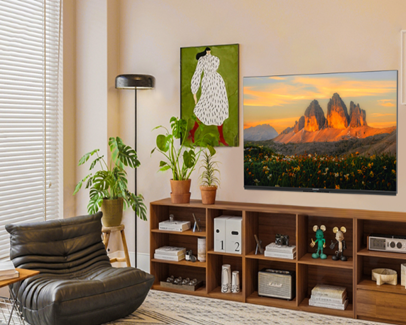
Check your television at different times of day. During daylight, notice whether direct sunlight reaches the screen or a bright window sits opposite the TV. At night, switch on your usual lights and look for reflections from ceiling fixtures, table lamps or floor lamps.
Then check from your normal viewing position. Record when the glare occurs and where it appears. If the reflection changes throughout the day, sunlight direction may be contributing to the problem. If it appears mainly after dark, indoor lighting may be responsible.
Test one adjustment at a time. This makes it easier to identify which change improves visibility and avoids changing picture settings before understanding the source of the glare.
A window directly opposite the screen can create a noticeable reflection. If practical, move the television to another wall or adjust its angle. When relocation is difficult, experiment with the seating position to see whether a small change reduces the reflection.
Consider everyone who uses the room. A setup that works from the centre of the sofa may not work from a side seat. Aim to keep the screen away from strong direct sunlight while maintaining comfortable viewing angles.
| Problem observed | Adjustment to try | What to consider |
|---|---|---|
| Window visible on screen | Change TV position or close blinds | Anti-reflection features |
| Lamp reflected in dark scenes | Move or dim the lamp | Screen surface specifications |
| Picture appears washed out | Reduce ambient light and adjust settings | Brightness and contrast |
| Glare varies between seats | Adjust seating or screen angle | Viewing-angle specifications |
Curtains and blinds reduce incoming daylight before it reaches the screen. Adjustable blinds are useful when sunlight enters strongly at particular times, while curtains can soften daylight through large windows. The best option depends on window direction, the intensity of sunlight and when you usually watch television.
Artificial lighting matters too. Move lamps away from positions where their reflections appear on the screen, or try softer, indirect lighting. If ceiling lights cause reflections during dark scenes, changing their position or brightness may help.
After making adjustments, watch a scene with dark areas to see whether reflections have become less distracting. The aim is to control glare while keeping the room comfortable, rather than making it completely dark throughout the day.
Brightness affects picture visibility in a well-lit room, while contrast influences the distinction between light and dark areas. Anti-reflection features are intended to reduce the impact of reflected light, but performance depends on the specific screen and viewing conditions.
When comparing models, examine the listed features rather than assuming a display technology guarantees a particular result. The skyworth mini LED range highlights local dimming, brightness and contrast capabilities, alongside anti-glare panel features on relevant models. Local dimming helps control brightness across picture areas, but it does not automatically eliminate reflections from windows or lamps.
If the image looks dim, try an appropriate picture mode and assess the result under your usual lighting. If a window remains clearly visible, address the reflection itself instead of continually increasing brightness. Compare individual model specifications and consider how the TV will perform in lighting similar to your living room.
Choose a television according to your room's lighting, layout and viewing habits. Start by identifying when sunlight is strongest and where people normally sit. Then compare documented screen features and picture specifications.
Window placement: Identify when sunlight reaches the screen and whether it creates a direct reflection.
Screen surface: Check for documented anti-glare or anti-reflection features on the specific model.
Brightness and contrast: Compare published specifications separately because they address different viewing conditions.
Viewing positions: Consider whether household members watch from the centre or sides of the room.
Room adjustments: Decide whether blinds, curtains or lighting changes could reduce glare without replacing the TV.
For buyers considering the skyworth QLED TV range, relevant QLED+ models highlight high brightness, vivid colour and anti-glare capabilities. These features may be useful for bright-room viewing, but check the specifications of the exact model rather than relying on the QLED name alone. If possible, view the model under bright showroom lighting, remembering that store conditions may differ from your home.
Not necessarily. Higher brightness may improve visibility, but it cannot reliably remove a reflected window or lamp. Adjust the light source and screen position first.
Yes, but this arrangement may increase visible reflections. Try another wall or adjust the screen angle if practical.
No. Mini LED describes a backlighting approach. Check the specific model's anti-reflection features separately.
Some QLED+ models list high brightness and anti-glare features. Suitability depends on the individual model and room conditions.
No. Blinds and softer, indirect lighting may reduce reflections while keeping the room comfortable.
A visible window or lamp usually indicates a direct reflection. A generally washed-out picture may require changes to ambient lighting or picture settings.

 sales@skyworthau.com

 English
 français